Manipulated Sounds Stem Separator – Standalone
Manipulated Sounds Stem Separator – Standalone
Couldn't load pickup availability
Digital download help
This product is supplied digitally. Check the description and selected option for the contents and usage terms. Need help accessing your purchase? Contact us with your order number.
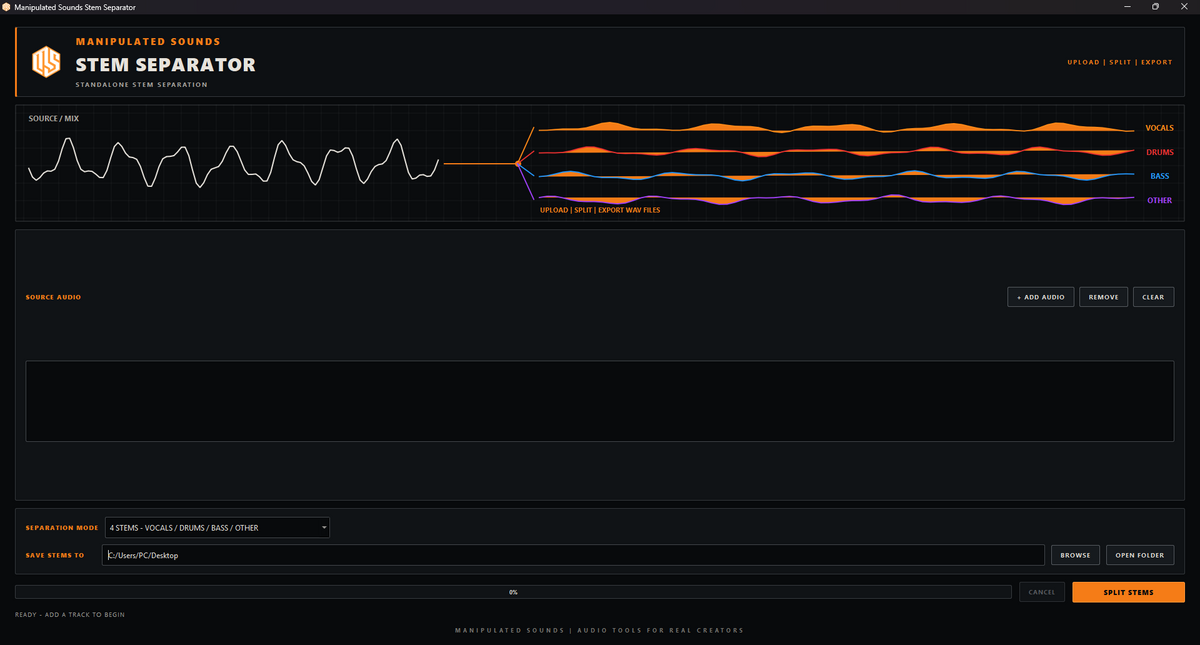
Contact usManipulated Sounds Stem Separator is a standalone Windows application designed for fast, straightforward audio stem separation.
Load your audio file, choose your separation mode and export the resulting stems directly to your computer.
The 4 Stem mode separates your track into Vocals, Drums, Bass and Other, giving you individual audio files that can be imported into your DAW, sampler or editing software.
For simpler vocal extraction, use Vocals + Instrumental mode to create separate vocal and backing-track files.
Stem Separator runs locally on your Windows computer. Your audio does not need to be uploaded to an online separation service.
Key Features
- 4-stem separation: Vocals / Drums / Bass / Other
- Vocals + Instrumental separation
- Standalone Windows application
- Drag-and-drop audio loading
- Supports WAV, AIFF, FLAC, MP3, M4A and OGG
- Local audio processing
- Export separated stems as audio files
- Dedicated Manipulated Sounds interface
- No DAW required
- Simple Windows installer
How It Works
Add an audio file, select your separation mode, run the separation and export the resulting stems. No DAW or plugin host is required.
System Requirements
- Windows 10 or later
- 64-bit Windows system
- Sufficient free storage for source audio and generated stems
Format
Standalone Windows Application
What's Included
- Manipulated Sounds Stem Separator v1.0.0 – Standalone
- Windows installer
- Required runtime components
Delivery
This is a digital software product. Your Windows installer is provided as a digital download after purchase.
FAQ
Do I need a DAW?
No. The Standalone edition runs as its own Windows application and does not require a DAW.
Does Stem Separator require an internet connection to process audio?
Stem separation is performed locally on your computer. Your source audio does not need to be uploaded to an online stem-separation service.
What stems can it create?
The 4 Stem separation mode creates Vocals, Drums, Bass and Other stems. A separate Vocals + Instrumental mode is also available.
What audio formats are supported?
WAV, AIFF, FLAC, MP3, M4A and OGG.
Can I use the separated audio commercially?
Stem Separator does not grant rights to the source material. You remain responsible for ensuring you have the necessary rights or permissions to use the original audio and anything derived from it.
Is this an AI music generator?
No. Stem Separator is an audio-processing tool for separating existing audio into component stems. It does not generate songs, compositions or performances.
IMPORTANT: Windows 64-bit only. Please check the system requirements before purchasing and downloading the software.
Share