Manipulated Sounds Stem Separator – VST3
Manipulated Sounds Stem Separator – VST3
Couldn't load pickup availability
Digital download help
This product is supplied digitally. Check the description and selected option for the contents and usage terms. Need help accessing your purchase? Contact us with your order number.
Contact usManipulated Sounds Stem Separator VST3 brings the Stem Separator workflow directly into your compatible Windows DAW.
Access stem separation from within your production environment rather than switching to a separate application.
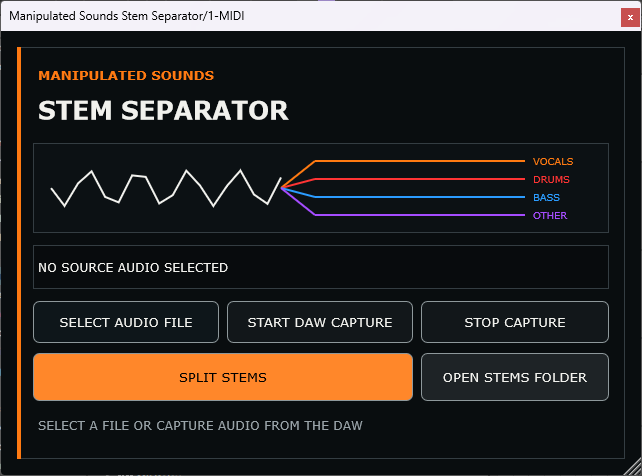
Stem Separator can divide complete audio into Vocals, Drums, Bass and Other, providing separated material for remixing, sampling, editing and production.
The VST3 edition is designed for producers who want Stem Separator integrated directly into their existing DAW workflow.
Key Features
- Stem separation from within a compatible DAW
- 4-stem separation: Vocals / Drums / Bass / Other
- VST3 plugin format
- Windows 64-bit
- Local audio processing
- Designed for music-production workflows
- Dedicated Manipulated Sounds interface
- Standard VST3 installation
System Requirements
- Windows 10 or later
- 64-bit Windows system
- VST3-compatible 64-bit DAW or plugin host
- Sufficient free storage for source audio and generated stems
Format
VST3 – Windows 64-bit
Installation
The installer places Stem Separator into the standard Windows VST3 plugin location:
C:\Program Files\Common Files\VST3\Manipulated Sounds\
After installation, rescan your plugins from your DAW if Stem Separator does not appear automatically.
What's Included
- Manipulated Sounds Stem Separator v1.0.0 – VST3
- Windows VST3 installer
- Required runtime components
Delivery
This is a digital software product. Your Windows installer is provided as a digital download after purchase.
FAQ
What is the difference between the VST3 and Standalone editions?
The VST3 edition is designed to run inside a compatible Windows DAW or plugin host. The Standalone edition runs as its own Windows application without requiring a DAW.
Does Stem Separator require an internet connection to process audio?
Stem separation is performed locally on your computer. Your source audio does not need to be uploaded to an online stem-separation service.
What stems can it create?
The 4 Stem separation mode creates Vocals, Drums, Bass and Other stems.
Will it work in my DAW?
Your DAW or plugin host must support 64-bit VST3 plugins on Windows. Please check your DAW's plugin compatibility before purchasing.
Can I use the separated audio commercially?
Stem Separator does not grant rights to the source material. You remain responsible for ensuring you have the necessary rights or permissions to use the original audio and anything derived from it.
Is this an AI music generator?
No. Stem Separator is an audio-processing tool for separating existing audio into component stems. It does not generate songs, compositions or performances.
IMPORTANT: Windows 64-bit only. A compatible 64-bit VST3 DAW or plugin host is required. Please check compatibility before purchasing and downloading the software.
Share